October 7, 2026
Parent Pro Tip for the HPS Mobile App - Subscribing to Groups
The HPS mobile app uses information from your Parent/Student Portal to send you information from the
- The District
- Your School
- Your Classroom(s)
But you can also SUBSCRIBE to additional Groups, Teams, Clubs, and Learning Groups.
By subscribing to SCHOOL/CLASS/GROUPs you will:
- receive group-specific updates.
- see calendar events for the group under the calendar tab on the app.
- have quick access to contact information for or to chat with the leader of the SCHOOL/CLASS/GROUP.
To SUBSCRIBE to additional Groups, Teams, Clubs, and Learning Groups:
Open the HPS Mobile App
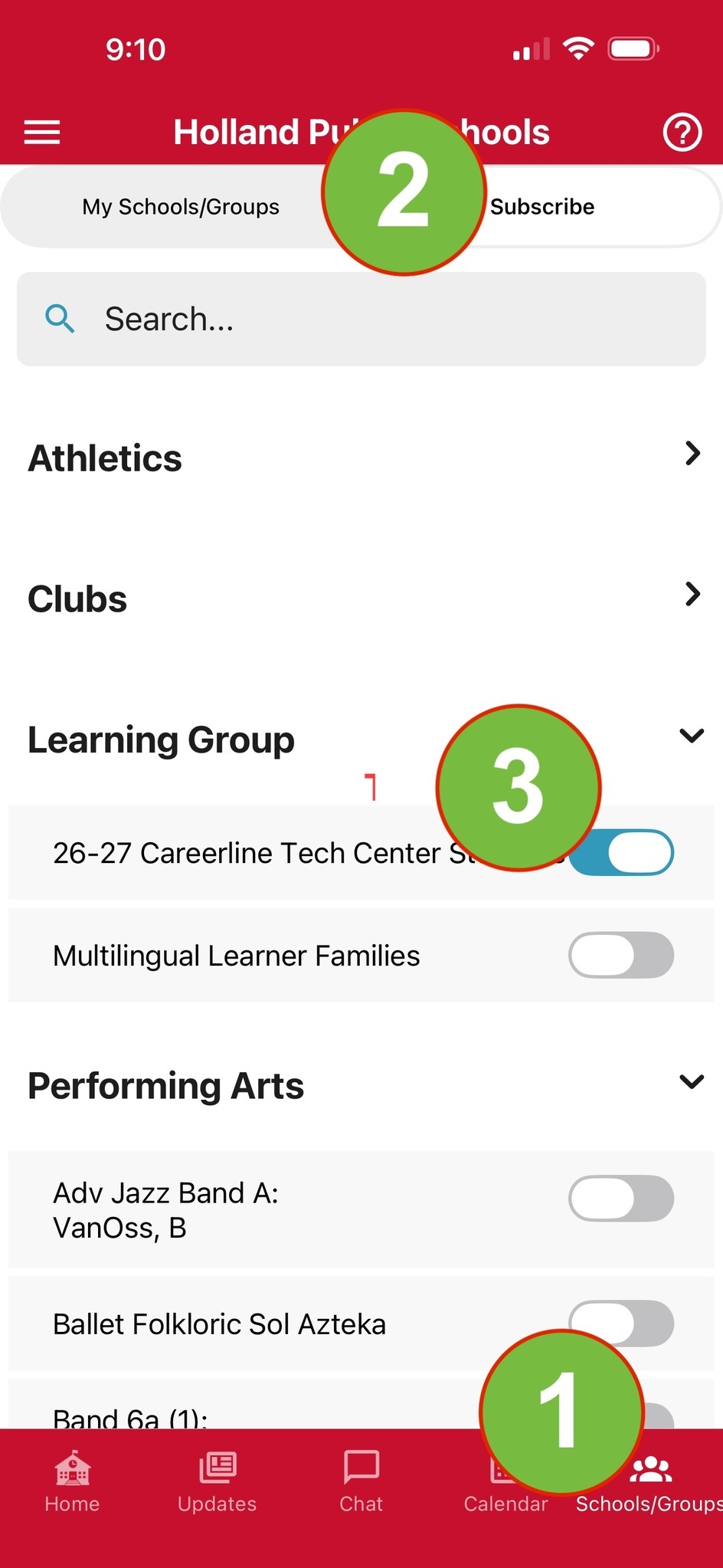
- In the bottom right, CLICK SCHOOLS/GROUPS. This screen will show you the SCHOOLS/GROUPS your are already subscribed to. By clicking the category then the SCHOOL/CLASS/GROUP name, you will see information specific to that SCHOOL/CLASS/GROUP, including contact information and updates for that SCHOOL/CLASS/GROUP.
- From the SCHOOLs/GROUP tab, CLICK SUBSCRIBE in the upper right. This screen will show you all the SCHOOL/CLASS/GROUPs you can subscribe to.
- By clicking the category then the SCHOOL/CLASS/GROUP name, you can SELECT THE TOGGLE to SUBSCRIBE to the SCHOOL/CLASS/GROUPs